
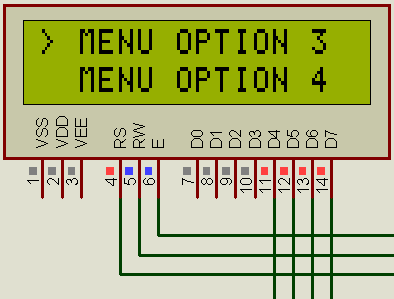

An option-selectable-menu on a text LCD using an AVR is not such a big deal, but having it sure saves a lot of time as such a menu can be quite helpful and useful in many projects. Here’s a video of the simulation:
I first made the menu for my AVR Tacho-meter project (AVR Tachometer [Gallery]) that I named Tachtastic…. The menu serves basic functionality like dynamic options (not to be changed on run-time), simple item selection via external input (next/prev button and select/back button), easyily implementable sub-menus (treated as separate menus which show up on a specific menu item selection)
I used the LCD library of Peter Fluery, the hardware in the project attached uses LCD with 2 lines so some changes will be needed if you have 2+line LCD, there are 4 external push-to-make buttons for prev/next and select/back.
The code is well-commented and self-explanatory, so I won’t be putting that up here, the project uses my template.h file (included in the download), the code might seem hard-wired at some places but easily modified. I have already used the same code with small changes in a other projects. So, I am putting all the stuff here, maybe someone will benefit or tell me how I can improve.
Software Used:
- AVR Studio with WINAVR (AVR GCC)
- Proteus for Simulation
- LCD Interface Library from Peter Fleury (http://www.jump.to/fleury)
[download id=”3″ format=”2″]
3 responses to “Selection Menu for Text LCD [AVR]”
Code is no longer available?
can i download your list code, please
Bhai download option kahan hai?